


What is a warehouse diagram? Instructions on how to draw a simple and effective warehouse diagram
06-10-2025 206
Warehouse layout plays an important role in optimizing storage space, shortening order processing time and ensuring goods are safely stored.
If you are preparing to set up a warehouse for your business or want to optimize your existing storage space, this article will help you understand how to draw a reasonable warehouse layout.
1. What is a warehouse layout?
Setting up a warehouse layout is not just about arranging shelves, but also about optimizing goods, ensuring that employees can easily see and process orders quickly. Therefore, a reasonable warehouse layout will help businesses save time, costs and improve work efficiency.
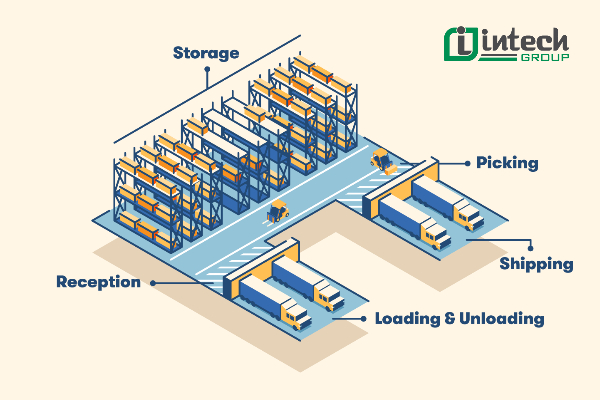
2. Steps to draw an optimal and scientific warehouse diagram
Making a warehouse diagram is an important step to help businesses optimize storage space, improve operational efficiency and minimize errors in the warehouse management process. Below are 3 simple steps to set up a professional warehouse diagram:
Step 1: Prepare a warehouse floor plan
Before drawing a warehouse diagram, you need a warehouse floor plan with detailed dimensions, including storage areas, aisles, doors and space for warehouse operating equipment. If you rent a warehouse, request a drawing from the warehouse owner or measure it yourself to ensure accuracy.
Many people are often subjective in arranging the warehouse, leading to wasted space, difficulty in searching and retrieving goods. A scientific warehouse diagram will help you manage goods easily and optimize operating time.
Step 2: Choose a warehouse mapping method
Depending on the size of the warehouse and your budget, you can choose one of the following three methods to draw a warehouse diagram:
- Hire an architect: Suitable for businesses with large warehouses, many goods and operating equipment systems such as forklifts, conveyor belts, and automatic pallets. A professional warehouse diagram helps optimize space and increase work efficiency.
- Use online tools: Support software such as SmartDraw helps you draw warehouse diagrams quickly, easily adjust, and has available design templates to optimize warehouse space.
- Draw a warehouse diagram with Excel: If you need a simple and free solution, Excel is also a useful tool to arrange warehouse areas visually.
Step 3: Arrange warehouse areas
After having a suitable floor plan and warehouse diagram drawing method, the next step is to arrange the warehouse areas scientifically. A warehouse is usually divided into three main areas:
- Operating area: Includes the area for receiving goods, packaging, checking orders and operating equipment such as pallets and forklifts. This is an area with high traffic density, which needs to be arranged reasonably to ensure an efficient working process.
- Storage area: Is a place to store goods with a system of shelves and racks. It needs to be arranged to make it easy to import and export goods and save storage space.
- Space & aisles: Aisles in the warehouse need to be designed wide enough for forklifts and employees to move easily. An optimal warehouse layout often has a closed circular aisle, helping the flow of goods to operate smoothly.
Making a reasonable warehouse layout helps businesses save time, optimize space and improve the efficiency of goods management.
3. Important areas and equipment in warehouse layout design
After completing the warehouse layout, arranging the space and equipping it with appropriate equipment will help optimize the operating process, ensure safety and improve management efficiency. Below are important factors you need to keep in mind when designing a warehouse:
Spacious and flexible receiving area
To ensure the process takes place quickly, this area needs to have enough space, allowing forklifts and warehouse staff to easily move and arrange goods. Newly imported goods need to be brought into the storage area immediately to avoid congestion, affecting the next batches of goods.
Space for machinery and equipment
In large-scale warehouses, the use of forklifts, conveyors, conveyor belts, and AGV self-propelled robots is indispensable. Therefore, it is necessary to set aside a separate area for machinery to operate, ensuring safe movement space and avoiding obstruction of the flow of goods.
Ventilation system ensures warehouse safety
Warehouses often store large quantities of products, especially items that are at risk of mold and damage. Therefore, equipping a ventilation system or airy windows is necessary to maintain a dry environment, protecting goods from harmful agents.
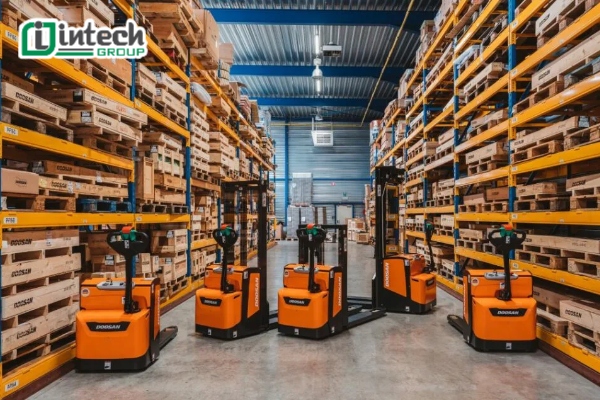
Ensure adequate lighting in the warehouse
Lighting in the warehouse not only helps improve work efficiency but also limits mistakes when taking inventory and importing and exporting goods. Arrange a high-power LED lighting system, spread evenly throughout the warehouse, especially in the storage area of best-selling items to facilitate the process of retrieving goods.
Equip a lift or a moving ladder
Modern warehouses often make the most of space by building high shelves, so a lift or a specialized ladder is indispensable equipment. For small-scale warehouses, equipping a moving ladder will help employees easily retrieve goods without taking too much time.
Fire extinguisher
Warehouses are places that contain many flammable materials such as wooden pallets, cardboard, and plastic packaging, so the risk of fire and explosion is always latent. Fire extinguishers need to be placed in easily accessible locations, helping employees promptly handle incidents if any.
Design a safe exit
In addition to ensuring operational efficiency, employee safety is also very important. Each warehouse needs a clear, open exit so that employees can quickly exit in an emergency.
4. Basic steps to manage a warehouse with Excel
Here are the basic steps to help you set up and manage a warehouse with Excel properly:
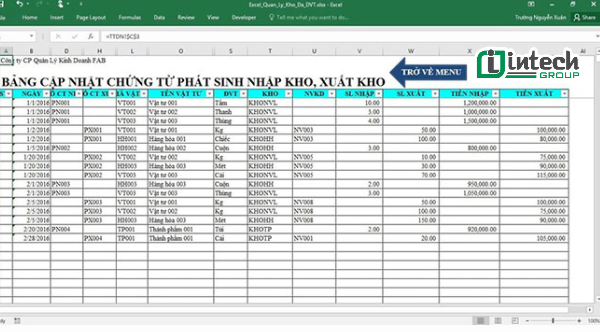
Step 1: Create a data file and enter warehouse information
First, you need to create an Excel file to enter data about products in the warehouse. Set up information columns suitable for the business items, including:
- Product code
- Product name
- Selling price
- Import quantity
- Export quantity
- Inventory quantity
Setting up these data fields helps you easily track the status of goods, control inventory quantities and manage import and export goods effectively.
Step 2: Apply automatic calculation formula
Excel supports formulas to help you manage inventory accurately and save time. Some basic formulas you can use:
For example: Inventory quantity = Import quantity – Sales quantity
Inventory value = Inventory quantity*Sell price
5. Warehouse management process flow diagram sample
If your business is planning to build a warehouse management flow diagram but doesn't know how to do it, you can refer to the warehouse management process flow diagram samples below from Intech Group.

Quy trình nhập kho
Quy trình xuất kho
Quy trình kiểm kê vật tư/hàng hóa lưu kho
Intech Group is proud to be a provider of comprehensive automation solutions including smart warehouse solutions and related items. We provide services including: Warehouse consulting and design: Design of warehouse system layout, robots, location layout and routes. Supply of transport robots (AGV; RGV... Contact Hotline 0966.966.103 / 0966 966 032 for direct advice and support.
