


What is HMI? Structure, function and application of HMI in industry
01-10-2025 678
HMI (Human Machine Interface) is a communication device between humans and machines, allowing operators to easily monitor, control and interact with the production system through an intuitive interface. To understand HMI, Intech Group will provide detailed information about HMI through the following article:
1. What is HMI?
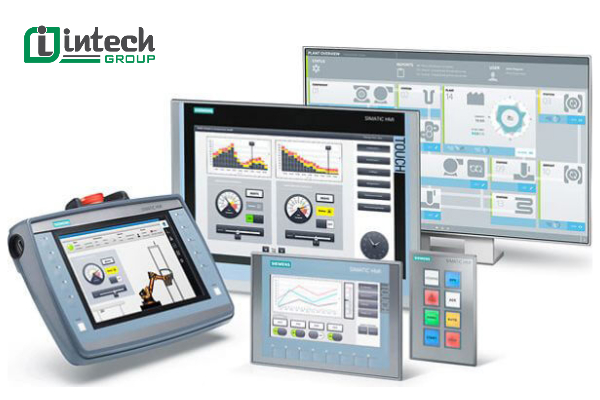
HMI (Human – Machine – Interface) is a communication device between humans and machines, allowing operators to monitor, control and supervise the system through an intuitive interface screen. In the context of modern industry, HMI plays a key role in the automation process, helping to improve the efficiency of management and operation of the production line.
2. Where is HMI applied?
In the context of the 4.0 industrial revolution, HMI devices have become an indispensable tool in promoting automation and optimizing production processes. HMI supports precise control of complex processes, minimizing errors and improving productivity.
Because of its flexibility and high efficiency, HMI is widely used in many industrial fields, including:
- Oil and gas industry
- Electrical and automation industry
- Steel manufacturing industry
- Electronics industry
- Textile industry
- Water supply and drainage industry
- Automotive and motorbike industry
- And many other production lines that require close control and supervision.

3. Structure of HMI
HMI (Human Machine Interface) consists of three main components: hardware, software and communication system.
HMI hardware: Includes display screen, processing chip, CPU, ROM memory, RAM and physical buttons. This is the physical platform that allows users to directly manipulate, control and monitor the system.
HMI software: Includes control functions, interface objects (objects), simulation tools, interface building tools and program loading. Software creates the intelligence of HMI, allowing the design of user interfaces and connections to other control systems.
Communication system: Includes connection ports such as USB, Ethernet, RS232, RS485 and popular protocols such as Modbus, MPI, CANbus... This system helps HMI easily connect to PLCs, machines and control devices in the production line.
4. Classification of popular HMIs today
HMIs today are classified based on operating platforms:
PC-based HMI: Usually runs on Windows operating systems and is integrated into SCADA monitoring systems. For example: Citect SCADA software, WinCC.
Embedded HMI: This is a specialized HMI that uses embedded devices as a platform, has a compact design, saves energy and is suitable for independent control systems, low cost.
In addition, there are some types of mobile HMI such as MobileHMI using handheld devices (Palm, PocketPC), providing high flexibility in remote monitoring and control.
5. What is the operating principle of HMI?
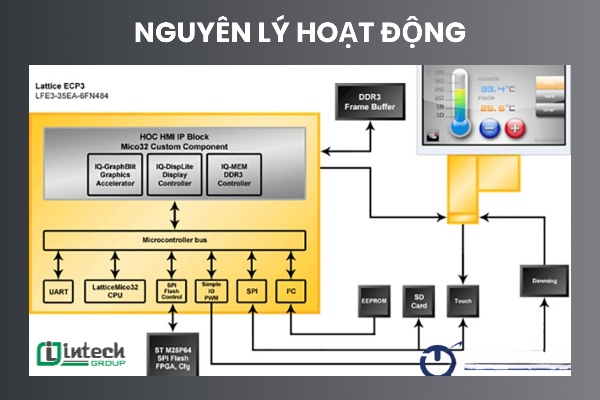
The operating principle of HMI (Human Machine Interface) is based on the two-way data exchange mechanism between HMI and control devices such as PLC (Programmable Logic Controller). The basic operating process takes place in the following steps:
Data collection: PLC receives data from sensors, switches, and input devices in the industrial automation system.
Data transmission to HMI: PLC sends data to HMI via popular communication protocols such as Modbus, Profibus, Profinet, EtherNet/IP, etc.
Information processing and display: HMI receives and processes data, then displays information on the screen in the form of visual graphics such as charts, data tables, or images for the operator to easily follow.
Interaction and control: The operator operates directly on the touch screen or via keyboard/mouse to send control commands to the system.
Transmission of control commands to PLC: HMI sends user operation commands back to PLC.
Command execution: PLC processes commands and controls output devices such as motors, valves, conveyors, etc. to perform actions as required.
6. Outstanding features of HMI in industry
HMI is not only a display device but also integrates many powerful features, supporting effective monitoring and control of production systems. Below are the main functions of HMI:
Visual display of data
Convert technical data into easy-to-understand information such as charts, images and text, helping operators easily monitor important parameters such as temperature, pressure, speed, material level, etc.
System control and monitoring
Allow users to send control commands to PLC and monitor the operating status of machines in real time, thereby detecting and handling problems promptly.
Smart warning and alarm
HMI can detect errors and warn operators with sound, signal lights or display messages when the system has problems or exceeds safety thresholds.
Logging and Data Storage
HMI supports real-time storage of events and operating parameters to serve the purpose of evaluating production performance and analyzing the cause of errors.
Management and Export of Production Data
Allows data collection, storage and export in various formats such as CSV, Excel or direct transmission to the management system for analysis and reporting.
Flexible Network Connection
Modern HMI supports connection via Ethernet, Internet or mobile network, helping to monitor and control the system remotely anytime, anywhere.
7. Benefits of HMI in Industrial Production
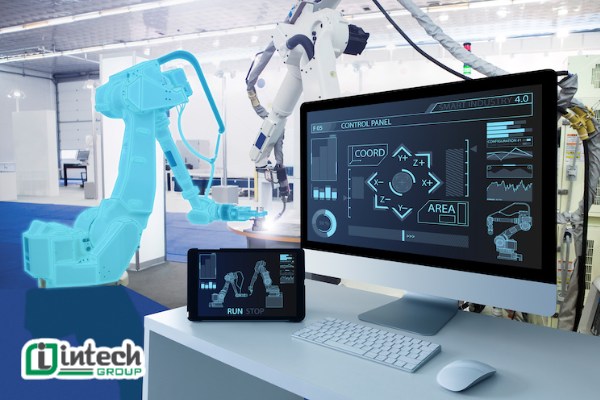
Integrating HMI (Human Machine Interface) in industrial control systems brings many obvious benefits. Below are the outstanding benefits of HMI:
Improve operational efficiency
HMI helps operators monitor and control the system in an intuitive and easy way. As a result, the production process is optimized, manual operations are minimized and labor productivity is increased.
Reduce downtime
Thanks to the ability to monitor in real time and detect system errors early, HMI helps handle problems promptly, reducing downtime and production losses.
Improve product quality
HMI supports close monitoring of important parameters such as temperature, pressure, speed, etc., helping to maintain a stable production process and ensure the quality of output products.
Optimize operating costs
Minimizing human errors, shortening downtime, and reducing the need for manual intervention helps businesses save on operating and equipment maintenance costs.
Enhance labor safety
HMI can warn when dangerous situations such as overload, leakage, overheating, etc. occur, thereby helping to prevent accidents and protect the safety of people and equipment.
Support data collection and analysis
HMI has the function of logging operations and storing production data. Data analysis helps improve system performance and make management decisions based on real data.
Flexible expansion
HMI can be easily customized, upgraded, and expanded to suit the changing requirements of the factory and future technology.

8. Process of building an industrial standard HMI system
8. Process of building an industrial standard HMI system
Designing and implementing an effective HMI (Human Machine Interface) system requires a systematic and scientific process. Below is the process of building an HMI in specific steps:
Step 1: Determine system requirements (Requirements Gathering)
This is the first step and plays a key role in the entire HMI design process. It is necessary to clearly define:
- The purpose of using the HMI system;
- Required monitoring and control functions;
- Type of data and number of signals to display;
- Operations that the operator needs to perform on the interface;
- Operating environmental conditions such as temperature, humidity, dust, etc.
- Industrial technical and safety standards that need to be complied with.
Step 2: HMI Hardware and Software Selection
Based on the identified requirements, it is necessary to select:
- HMI hardware suitable for the environment and purpose of use: screen size, resolution, processor, memory, communication port (Ethernet, RS-232/485 ...);
- HMI programming software compatible with the hardware and capable of connecting to PLC or other peripheral devices.
Step 3: Interface Design
HMI interface design must be intuitive, easy to use and friendly to the operator. Note:
- Clear, logical screen layout;
- Harmonious colors, prioritizing contrast for easy observation;
- Simple, easy-to-understand icons and images;
- The location of the control buttons is reasonable and easy to operate.

Step 4: HMI Programming
Use specialized software to program functions as required. Main tasks include:
- Configuring HMI connection with PLC and devices;
- Creating screens to display status, parameters, and processes;
- Setting up controls for buttons, switches, and sliders;
- Programming warnings and alarms when the system has problems;
- Create activity logs, record data, and analyze operating history.
Step 5: Testing and Commissioning
After programming is complete, the entire system must be tested to ensure that the HMI operates stably and accurately. Testing steps include:
- Checking the communication connection between HMI and PLC;
- Checking the display screens and user interface;
- Testing the actual control functions;
- Evaluate the system's performance and responsiveness;
- Check the alarm function and data logging.
Step 6: Operation and Maintenance
Maintenance work includes: Updating HMI software when there is a new version; checking and cleaning HMI hardware; backing up data periodically to avoid losing important information and quickly fixing errors or warnings during operation.
9. Compare HMI, PLC and SCADA
PLC (Programmable Logic Controller) processes signals and controls devices.
HMI (Human-Machine Interface) is an intuitive interface that helps people monitor and control the process via PLC.
SCADA is a remote monitoring and control system that synthesizes many HMIs, PLCs and devices in a large industrial network.
| Criteria | HMI (Human Machine Interface) | PLC (Programmable Logic Controller) | SCADA (Supervisory Control and Data Acquisition) |
| Main functions | Human-machine interface, display, monitoring and control | Perform logic control, process input/output signals | Monitor, collect data and control the system on a large scale |
| Role | Be the “face” of the system where humans interact with machines | Be the “brain” of the system that performs automatic control | Be the “high-level coordinator” that monitors and controls multiple HMIs and PLCs |
| Input | Action from the operator (touch, press, input) | Control signals to output devices (valves, motor, relay) | Send control commands from the center to distributed devices |
| Output | Display data, send commands to PLC | Control signals to output devices (valves, motor, relay) | Send control commands from the center to distributed devices |
| Scope of operation | On-site, focused on a small machine or line | On-site, attached to a specific device | Over a large area, can include many factories, systems spread across geography |
| Nature | Hardware + display/communication software | Dedicated hardware for logic control | Software system integrated with network infrastructure and large data storage |
| Typical applications | Production lines, packaging machines, industrial robots | Control of machinery, automatic equipment | Power grid, water supply, oil and gas, large-scale or distributed factories |
| Scalability | Limited to the range of directly connected devices | Limited by the number of physical I/Os | Very flexible, expandable on demand, integrated with central monitoring system |
| Relationship | Communicate with PLC to get data data and send control commands | Execute commands from HMI or SCADA | Manage the entire HMI and PLC system, perform coordination and monitoring from the center |
10. Common HMI Problems & Troubleshooting Guide
Here is a summary of common HMI problems and troubleshooting guides to help you handle them effectively.
| Problem | Possible Cause | Solution |
| Screen Freezes/Unresponsive | System Overload, Software Error, Hardware Error, Communication Problem | Restart HMI, Optimize Software, Check System Resources, Check Communication, Check Hardware. |
| Connection Error | Network Problem, Cable Problem, Protocol Mismatch, Driver Problem, PLC Problem | Check Physical Connection, Verify Network Configuration, Check Protocol Settings, Update Driver, Check PLC Status, Use Diagnostic Tools. |
| Faulty display | Hardware error, loose connection, backlight error, software error (less common) | Check connection, check for damage, test with external monitor (if possible), adjust brightness/contrast, contact vendor. |
| Slow/lag response | Insufficient processing power, ineffective software, network congestion, excessive data logging | Optimize software, upgrade hardware, check network traffic, reduce data logging, review application design. |
| Unauthorized access | Weak password, lack of user authentication, network vulnerability | Enforce strong passwords, enable user authentication, configure user roles and permissions, configure firewall, conduct regular security checks, update software. |
| Alarm Management Issues | Incorrect Configuration, Communication Problem, Software Error | Verify Alarm Configuration, Check Communication, Check Alarm, Review Alarm Logic. |
11. Applications of HMI in Industrial Automation
HMI (Human Machine Interface) plays an essential role in modern automation systems. With the ability to visualize data and allow operators to monitor and control equipment, HMI is widely used in many industrial fields as follows:
Industrial production: Monitoring and controlling production lines, CNC machines, automatic robot systems.
Energy: Managing electrical systems, monitoring transformer stations, controlling solar and wind power systems.
Transportation: Traffic light control systems, passenger information boards, train control.
Oil and gas: Monitoring mining systems, controlling oil and gas transportation and distribution processes.
Water treatment: Controlling water filtration systems, monitoring clean water and wastewater treatment plants.
Smart buildings: Managing HVAC, lighting, security and automation systems in buildings.
12. Future Trends in Human-Machine Interface (HMI) Technology
Here are some of the emerging technology trends that will shape the future of Human-Machine Interface (HMI) systems:
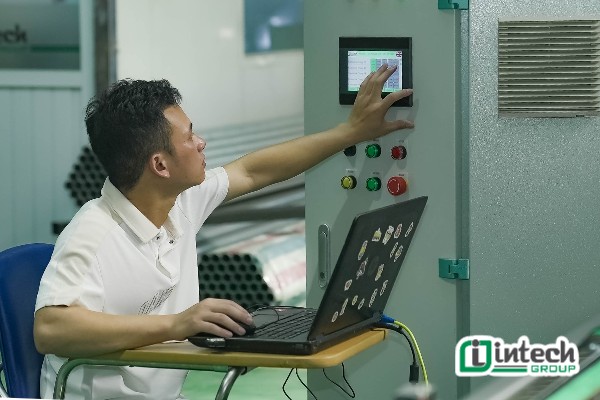
Using mobile devices: Operators can access and control HMIs from smartphones and tablets, providing flexibility and convenience.
Cloud-based HMI: HMIs will be hosted on cloud platforms, allowing remote access and easy data sharing from anywhere.
Advanced visualization: Using technologies such as 3D graphics, augmented reality (AR), and virtual reality (VR) to create intuitive and easy-to-use interfaces.
Integrating artificial intelligence (AI): AI will be applied to HMIs to predict maintenance, detect abnormalities, and automate intelligently, increasing efficiency and reducing risks.
Improve cybersecurity: With the increase in cyber threats, protecting HMI from cyber attacks will be a top priority, including data encryption and user authentication.
Edge computing: Processing data near the source helps reduce response time, supporting real-time HMI systems in high-speed applications.
Enhance user experience (UX): HMI will be increasingly designed to be more user-friendly, with intuitive, easy-to-use interfaces, and optimized user experience.
The above is an overview of HMI in industrial production. If your business is looking for automation solutions for your business, please contact Intech immediately. Intech Group provides industrial automation solutions, including AGV autonomous robots, conveyors, and automated conveyors to suit the production needs of businesses.
