


What is a PDA? Useful features that a sales PDA device brings
07-10-2025 1.101
In the era of strong technological development, PDA (Personal Digital Assistant) devices are increasingly widely used in warehouses and in restaurant and food service.
So what benefits does a PDA really bring to business owners? What types of PDAs are there today and where should you buy a sales PDA? Let's find out more about this technology with Intech Group in the article below.
1. What is a PDA?
A PDA (Personal Digital Assistant) is a handheld digital device with a compact design, helping employees complete their work more quickly and efficiently. PDAs have the ability to store and process information, helping to save time and increase productivity.
Currently, there are two popular PDA lines on the market, which are inventory PDA and sales PDA.
• Inventory PDA
An inventory PDA is a handheld barcode scanner, integrated with memory and an operating system to help store and process information quickly. This device works like a smartphone, helping employees easily scan barcodes, check and manage goods in the warehouse accurately and effectively. The inventory PDA helps minimize errors and save inventory time.
• Sales PDA
The sales PDA is a handheld device that integrates sales management software. It helps employees easily perform tasks such as ordering food, issuing sales invoices and paying directly at the table for customers. This device helps the customer service process at restaurants and eateries become faster, more professional and more optimal. Sales PDA not only helps improve service quality but also helps businesses manage sales effectively.

2. Benefits of using PDA devices
2.1. Benefits of PDA inventory devices
Optimize working time and save labor costs
Applying PDA inventory devices to the warehouse management process helps employees quickly scan the identification code on each product to identify product information, inventory and classify the warehouse accurately and effectively. Thanks to that, you save time and effort, while minimizing labor costs.
Optimize search and inspection activities
After scanning the barcode, the PDA will encode and send information to the management system. When employees log in to the computer connected to the PDA, all warehouse data will automatically appear, making it easy to inventory and compare goods without any errors.
Create a professional working environment
Applying PDA helps the work process become fast and accurate, creating a professional feeling for employees. This not only improves working spirit but also helps them improve their work style and responsibility.
Accurately manage warehouse data for future operations
With accurate control of warehouse data, you can easily plan warehouse receipt and allocate resources and finances appropriately, helping your business operate more effectively in the long term.
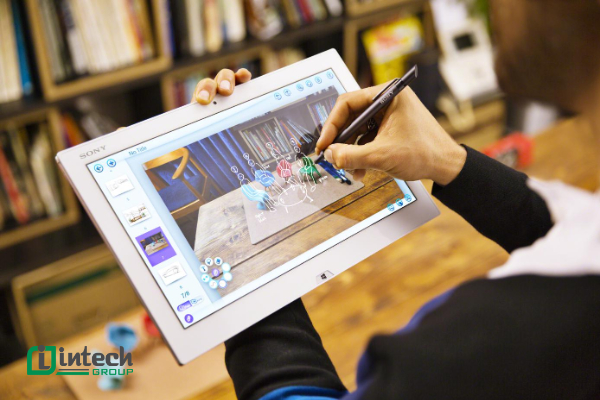
2.2. Benefits of PDA sales devices
Compact, convenient and lightweight design
The PDA sales device has dimensions of 271mm x 89mm x 58mm and weighs only 450g, making it easy for employees to hold and move to the customer's table to perform sales operations quickly and flexibly.
Multi-touch screen
The sales PDA is equipped with a super-sensitive multi-touch screen, making it easy for employees to perform sales operations without encountering operational difficulties.
Print invoices quickly and save ink costs
The sales PDA integrates a 57mm thermal printer with a printing speed of up to 60mm/s, allowing employees to quickly print invoices after completing an order. Thermal printing technology helps you save ink costs and minimize problems during the printing process.
Integrated direct barcode scanning camera
The sales PDA is equipped with a barcode scanning camera, making it easy for employees to scan barcodes on products or orders. This is very suitable for retail models or crowded restaurants, helping the payment process take place quickly and accurately.
Integrated sales management software
The sales PDA is integrated with sales management software, allowing employees not only to make transactions but also to track inventory and view detailed business reports right on the device. This helps manage work and sales processes more effectively and flexibly.
Sales and inventory PDA are important tools, helping businesses improve work efficiency, save time and costs, and bring a professional experience to customers.
3. Useful features that sales PDA devices bring
3.1. Features of Inventory PDA
The inventory PDA supports employees in scanning product codes, inventory and reconciliation of goods quickly and accurately. When scanning product codes, information will be automatically synchronized with the management server, helping managers easily monitor and check warehouse status.
In addition to this basic feature, the inventory PDA also integrates other useful functions such as listening to music, recording, watching movies, taking photos, recording videos, making phone calls, finding directions, and controlling electronic devices remotely. Traditional communication ports such as USB, memory cards and infrared ports are also supported, making it convenient to connect and use peripheral devices.

3.2. Features of Sales PDA
Full support for sales operations
The sales PDA integrates sales management software to help shop owners easily track and check orders, from ordering to changing dishes. The data will be synchronized and displayed in detail, helping shop owners control revenue and compare accurate data. Fabi software also supports popular payment methods such as Momo, ZaloPay, VNPay, making payment quick and convenient.
Simple ordering, easy to use
With an intuitive and friendly software interface, employees can perform sales operations quickly. Fabi software is also compatible with devices such as phones or tablets, helping employees easily order at the table and order information will automatically be transferred to the kitchen, optimizing the service process.
Full and detailed reporting features
Fabi Ipos software provides detailed reports on revenue and expenditure, profit and loss, purchase history and invoice statistics, especially reports specifically for the F&B industry. Shop owners can easily monitor the business situation and identify errors or opportunities for improvement. In addition, the software also saves the transaction history of each employee, helping shop owners manage employees more effectively.
Easy remote management anytime, anywhere
Without having to be present in person at the shop, shop owners can monitor the business situation and transactions via Fabi software on their phones or laptops. All information such as revenue, customer invoices and transactions are updated in real time, helping shop owners grasp the situation remotely.
Comprehensive synthesis of other basic management features
Fabi software also supports warehouse management functions, helping shop owners track inventory and proactively import more goods when necessary. Customer management features, online order processing, kitchen coordination, and accounting operations are also integrated, helping to reduce manual work and improve employee productivity.
The sales PDA not only helps optimize the sales process but also helps restaurant owners manage all aspects of business operations more effectively. From tracking orders to managing inventory and staff, the sales PDA provides a comprehensive solution for restaurants and eateries.
4. The main role of PDA in the warehouse system
Importing raw materials
PDA is a useful tool to help manage the import of raw materials, supporting faster, more accurate and efficient work processes. The main functions of PDAs in warehousing include:
Entering goods information
PDAs allow users to enter detailed information about new materials delivered to the warehouse, including barcodes, product names, quantities, and any product or lot descriptions. This helps to optimize the management of goods information, minimizing errors in data entry.
Quality inspection
PDAs are capable of recording information about the quality of raw materials. Users can create and store information related to quality checks, expiry checks, or other inspection factors such as uniformity and safety of raw materials. This helps to ensure that only qualified raw materials are received into the warehouse.

Origin Recording
PDA supports recording information about the origin of raw materials, including suppliers, production dates, and countries of origin. This is useful for tracking and checking the consistency and transparency of raw materials, as well as serving traceability and quality control requirements.
Goods Receipt Confirmation
PDA helps warehouse staff confirm the information and quantity of goods received, comparing them with orders or parcels to ensure accuracy. This process helps minimize risks and errors when receiving goods, ensuring that the quantity and information of goods in the system match the reality.
Create History Records
The PDA will automatically create a history record when performing the warehouse receipt process, including the time and person performing it. This helps the warehouse system easily track the history of receipts, serving warehouse management and solving problems that arise later.
Connect to the warehouse management system
PDA has the ability to connect directly to the warehouse management system (WMS or ERP) to update and synchronize data. This helps ensure that all information about goods and warehouses is always updated promptly and accurately, minimizing errors and improving warehouse management efficiency.
PDA not only helps increase work efficiency but also helps warehouse management become more professional, faster and more accurate, from warehousing raw materials to quality control and tracking of goods history.
5. Top best PDA devices today
5.1. PDA barcode scanning devices for inventory
Point Mobile PM85 Inventory Checker
Point Mobile PM85 PDA Inventory Checker is a powerful and efficient mobile device, ideal for warehouse checking and barcode scanning in harsh industrial environments. Here are the detailed specifications of the device:
- Design: Smartphone
- Industrial standard: IP-67 (Dust and water resistant)
- Code scanning: 1D/2D Barcode Scanner
- Impact resistance: 1.8m (Shockproof)
- Camera: Front 5.0 Megapixel, Rear 13.0 Megapixel
- RFID: HF RFID / NFC
- Dimensions: 157.6 x 78 x 18.86mm
- Weight: 256g (STD), 315g (EXT)
- Keypad: Touch screen / 9 physical keys (Recent Apps, Home, Back & 2 Programmable, Scan, Volume up/down, Power)
- SIM Slot: Dual-SIM + 2 SAM Slots
- SD Card Slot: Supports Micro SD memory card up to 32GB
- Connection port: High speed USB 2.0
- Standard battery: 2,900 mAh, expandable up to 5,800 mAh
- Display: 5.0" FHD (1080 x 1920), multi-touch, Corning Gorilla Glass
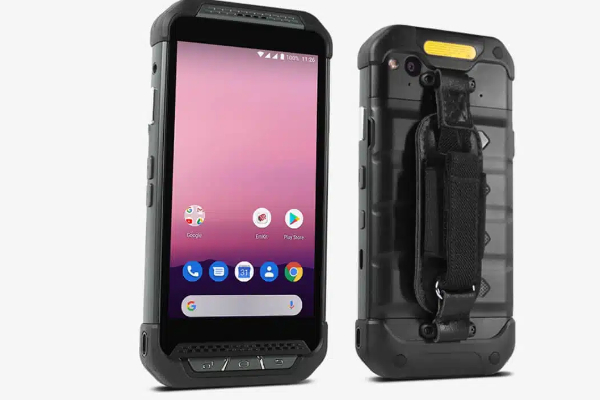
- Configuration:
- Operating system: Android 9.0 Pie
- Processor: Qualcomm Snapdragon Octa-core 1.8 GHz
- RAM: 3 GB (4 GB option)
- ROM: 32 GB (64 GB option)
- Connectivity: 4G LTE, WLAN (802.11a/b/g/n/ac/d/h/i/k/r/v), Bluetooth 5.0, GPS (GNSS supports GPS, GLONASS, Galileo and Beidou)
- Operating environment:
- Humidity: Non-condensing, 95%
- Operating temperature: -20°C to 60°C
- Storage temperature: -25°C to 70°C
- Military certification: MIL-STD-810G
5.2. Point Mobile PM451 Inventory Controller
The Point Mobile PM451 PDA Inventory Controller is an ideal choice for warehouse environments that require high performance and long-term durability. The PM451 specifications include:
- Dimensions: 214.94 x 77.26 x 39.25mm
- Weight: 450g
- Keyboard: Keyboard options: Numeric, Function Numeric, Alphanumeric
- Interface: USB 2.0 Type C/OTG
- Battery: 5,700mAh (standard), 4,000mAh (optional)
- Display: 4.3 inches, 480 x 800 pixel resolution (WVGA), IPS panel, Corning® Gorilla® glass 5
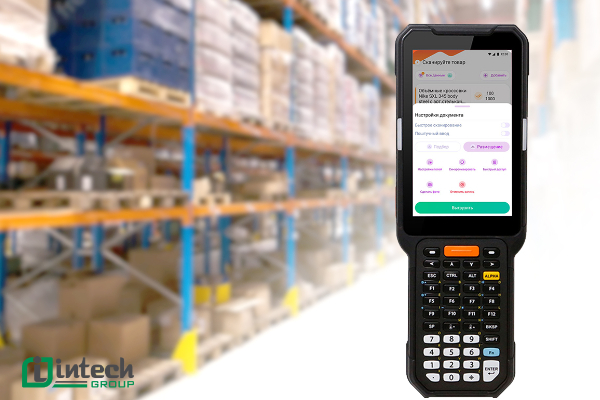
- Configuration:
- Operating system: Android 9
- Processor: Qualcomm® SDA660 2.2GHz Octa Core 64-bit CPU
- RAM: 4GB
- ROM: 64GB
- Connection port: WLAN (IEEE 802.11 a/b/g/n/d/h/i/k/r/v), GPS (Qualcomm GPS GNSS Receiver supports GPS, GLONASS, Galileo and Beidou), Bluetooth 5.0
- Scan mode: 1D code scanning, 2D Barcode Imager, 2D Long range Imager
- Industrial standard: IP65 (Dust and water resistant)
- Impact resistance: 1.5m
- Operating temperature: -20°C to 50°C
- Storage temperature: -40°C to 70°C
The Point Mobile PM85 and PM451 PDA devices are both good choices An excellent choice for inventory and goods management in industrial environments. With powerful, durable features and diverse connectivity, they help optimize workflows, improve warehouse management efficiency and minimize risks in warehouse system operations.
